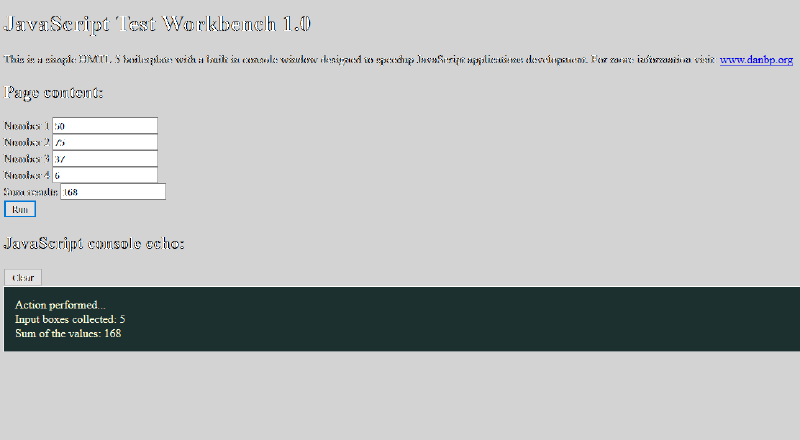
Simple HTML 5 boilerplate for quick JavaScript applications development and testing. Comes with a built in console box and some input fields and buttons to speed up the development.
A working sample is available here.
<!doctype html>
<html lang="en">
<head>
  <meta charset="utf-8">
  <title>JavaScript Test Workbench</title>
  <meta name="description" content="Just a Javascript Test Tool">
  <meta name="author" content="Daniel Brooke Peig">
  <style>
  /* The colors of the page were adjusted to display "hidden" white objects */
  body {
	  background-color: LightGrey;
	}
	#jstwLog {
	  vertical-align: top;
	  width: 95%;
	  border: 1px solid white;
	  background-color: #1d3030;
	  color: LightYellow;
	  padding: 15px;
	}
  </style>
	<!-- Your style-sheets go here -->

	<!-- End of your page style-sheets-->
</head>
<body>
	<h1>JavaScript Test Workbench 1.0</h1>
	This is a simple HMTL 5 boilerplate with a built in console window designed to speedup JavaScript applications development. For more information visit: <a href="hrrp://www.danbp.org">www.danbp.org</a>
	<h2>Page content:</h2>
	<div id="jstwContent">
		<!-- Your page content goes here -->

		Number 1 <input type="text" value="50"><BR>
		Number 2 <input type="text" value="75"><BR>
		Number 3 <input type="text" value="37"><BR>
		Number 4 <input type="text" value="6"><BR>
		Sum results <input type="text" value="0"><BR>
		<button type="button" onClick="RunScript()">Run</button>

		<!-- End of your page content -->
	</div>

	<!-- JavaScript console block-->
		<h2>JavaScript console echo:</h2>
		<button type="button" onClick="document.getElementById('jstwLog').innerHTML = ''">Clear</button>
		<div id="jstwLog">Script syntax error! Check browser's console window.</div>
		<script>
		//This script echoes the JavaScript console messages to the main HTML page
			(function () {
				if (!console) {
					console = {};
				}
				var old = console.log;
				var logger = document.getElementById('jstwLog');
				logger.innerHTML = "";
				console.log = function (message) {
						old(message);
						if (typeof message == 'object') {
							logger.innerHTML += (JSON && JSON.stringify ? JSON.stringify(message) : String(message)) + '<br />';
						} else {
							logger.innerHTML += message + '<br />';
						}
				}
			})();
		</script>
	<!-- End of the JavaScript console block-->


<script>
// JavaScript extra debug code part 1
//--------------------------------------------------------------------------------------------------------
"use strict"; //Prevents the use of undeclared variables
console.time("MyScript"); //Start the script timer
//--------------------------------------------------------------------------------------------------------
</script>

<!-- Your JavaScript code goes here -->
<script>
//Start of the sample code
function RunScript(){
	console.log("Action performed..."); //Indicates the script is working
	var inputBoxes = document.getElementsByTagName('input'); //Get the input boxes
	console.log("Input boxes collected: "+inputBoxes.length);
    var sum = Number(inputBoxes[0].value) + Number(inputBoxes[1].value) + Number(inputBoxes[2].value) + Number(inputBoxes[3].value);
	console.log("Sum of the values: "+sum);
	inputBoxes[4].value = sum;
}
</script>
<!-- End of your JavaScript code -->


<script>
// JavaScript extra debug code part 2
//--------------------------------------------------------------------------------------------------------
console.timeEnd("MyScript"); //Stop the script timer
//--------------------------------------------------------------------------------------------------------
</script>

</body>
</html>
Downloads #
- Version: 1.0
- Platforms: Windows
- Size: 2 KB
- Download links: